

What is Schema Markup? How important is it for local SEO?
What is Schema (Structured Data Markup)?
 Schema is a common short term for structured data, named after Schema.org, the website for structured data markup. It was created by a collaborative team from Google, Bing, and Yahoo. It’s not too often that competitors come together with a common purpose. But structured coding is important enough for them to do it. It creates an agreed-upon set of rules for structured data that tells the search engines exactly what kind of information is on your website.
Schema code goes into the HTML code that tells a browser what information is on your website and how to display it. According to schema.org:
Most webmasters are familiar with HTML tags on their pages. Usually, HTML tags tell the browser how to display the information included in the tag. For example, <h1>Avatar</h1> tells the browser to display the text string “Avatar” in a heading 1 format. However, the HTML tag doesn’t give any information about what that text string means — “Avatar” could refer to the hugely successful 3D movie, or it could refer to a type of profile picture—and this can make it more difficult for search engines to intelligently display relevant content to a user.
Schema for SEO
 We always recommend that our SEO clients include schema structured data markup as an important SEO technique. That’s because giving the search engines structured data helps them understand your webpages better and results in a ranking increase for you. It’s especially critical for local SEO.
One study determined that websites with schema coding rank an average of four positions higher in search engine results than those without schema markup.
Schema allows search engines to better understand addresses, dates of events, phone numbers, email addresses, and other information about you. So it helps Google understand:
- who you are
- what you do
- how to reach you,
- and (critical for local businesses) where you are.
There’s a comprehensive guide to structured data from the folks at 3 White Hats. Search Engine Watch has posted a good article about why businesses should implement structured data. And for a strictly local business focus, Search Engine Journal has a guide on How to Use Schema for Local SEO.
You don’t need to know structured data details
Since schema is in the HTML code of your website, it’s the responsibility of your web designer to understand how to write that part of the code for your site. The structured code in schema tends to be detailed and complex. Unless you’re acting as your own web designer, the two things you need to know about schema on your website are
- Why it’s important, and
- Making sure that it’s there.
Surprisingly, according to recent research fewer than one-third of websites use schema markup.
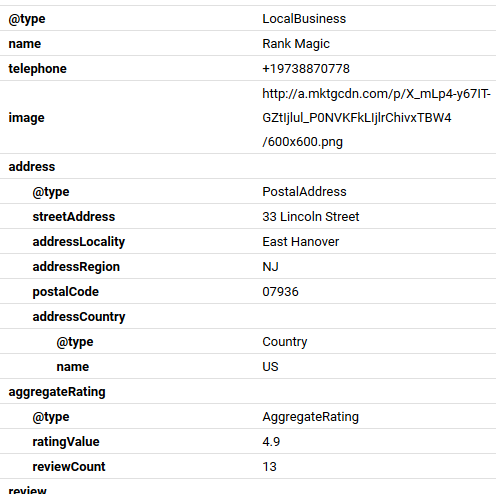
Did I say this stuff is complex? True. Above is a small sample of structured code from Google’s Structured data Testing Tool. But that’s why your small business’ competitors are probably not using it. So implementing it on your own site gives you a significant advantage over those competitors who don’t use it.
[Update October 19, 2020] For those of you who’d like a more thorough treatment of everything available in schema code, check out FatJoe’s article Everything You Need to Know About Schema Markup in 2022.
Don’t worry!
 There is a stupefyingly simple way to implement this stuff on your website. It’s a lifesaver if you’re doing your own coding, but even if your webmaster does it for you, this solution can save significant time, effort, and money.
I have long been a proponent of Yext PowerListings for local businesses. Yext is the leader in local data management, and many of my clients subscribe to their Knowledge Graph service. [Full disclosure: I am a Yext Certified Partner] In a nutshell, PowerListings gives you a single place to enter tons of information about your business which is then published on more than six dozen local search engines, directories, maps, and mobile apps.
The simple solution: Yext Knowledge Tags
 Yext Knowledge Tags is an enhancement to their Knowledge Graph PowerListings which provides a simple short snippet of code to add to your web pages that will implement full schema coding throughout. If anything changes in your Knowledge Graph, it’s automatically reflected in the schema code on your website. Immediately.
For existing subscribers, this is a no-brainer in my opinion. But whether or not you currently subscribe to the Yext Knowledge Graph or “PowerListings”, this is worth your serious consideration. I refer you to our explanation of local SEO, citations, and PowerListings.


 If you copied significant amounts of content from another website (even if you own that other website) Google considers it to be duplicate content. Google is excellent at identifying duplicate content and will usually try to show only the oldest of those duplicate pages. If you think about it, it’s pretty obvious that there is little benefit to the user if Google shows a bunch of pages that all say the same thing. So Google doesn’t do that. If the content on your page is not original, it may never show up in Google search results.
 “Alexa, tell me about voice search”
 When you add structured data to your pages, you’ll need to use what’s known as ‘schema markup’. This is a specific type of HTML code that lets Google recognize the format of the data you’ve added, and – crucially – pull this data through for search result snippets. Think of it like speaking to the Google bots in a language they can understand. And the better they understand you, the better chance your site will have of ranking.
 The way we type a search query is different from the way we search by speaking aloud.
 Mobile responsiveness is no longer the secret of clued-up web designers; all the
  About the Author
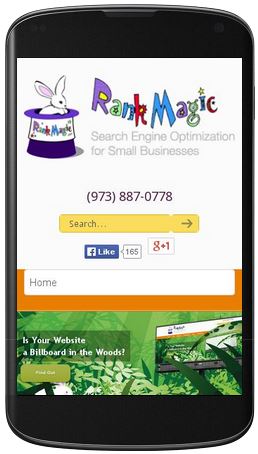 If SEO is about ranking higher to become more visible to as many people as possible, then all website owners should do mobile SEO right away. After all, mobile website traffic now accounts for more than half of all online traffic worldwide.
 SEO has a set of best practices that will most definitely help your website rise in the search page rankings, because they play by the rules set by Google et al. These methods are referred to as white-hat SEO, and they include quality link building, keyword research, creation of original and high-quality content, internal linking, and speeding up loading time.
 Never get swayed by promises of quick SEO results, because there is no such thing. If anything, search engine optimization is a long-term game. For decent SEO work to get any results, you will have to wait about four months to six months, and the results wouldn’t even be that great. However,
  Shawn Byrne is the founder and CEO of