Where you show up in Google search results is determined by an algorithm that evaluates many characteristics of your website. Those characteristics, or ranking factors — both positive and negative — affect how visible you will be in search results.
Google’s ranking algorithm is reported to contain more than 200 SEO ranking factors, each with its own weight or level of importance.
Nobody knows all of the Google ranking factors, but experience gives us a really good sense of which are the most important.
Categories of Google ranking factors
There are three groups of ranking factors that are important to understand.
Technical ranking factors tend to be mostly managed by your web designer. They have to do with your website’s level of performance and what I refer to as Google-friendliness. These are typically site-wide factors rather than factors relating to individual pages on your site.
On-page ranking factors are typically controlled by you and relate directly to the content of your web pages and keyword optimization.
Off-page ranking factors are things you have somewhat less control over because they’re not on your website. These typically relate to your authority or importance on the web, based largely on backlinks.
Here is what I considered to be the top 10 positive Google ranking factors today. This list isn’t in any kind of priority order for a couple of reasons. First, it would be pretentious to claim that I know which of these factors are more important than which others. Secondly, good SEO is a function of many small techniques that support each other. No one of them is critically essential to good rankings — it’s the sum total of all of them that matters.
Mobile phones now account for more than half of all searches done. As a result, it’s essential that your website be mobile-friendly. I typically recommend ensuring your website is “responsive” which means that its display varies depending upon the device connecting to your site. That ensures that the same information is available regardless of the platform your visitor may be using.
2) Security (SSL and HTTPS)
Whether or not your website is secure is a ranking factor at Google. Beyond that, many browsers will show a “Not Secure” warning in the address bar when someone arrives on your website. Some website plug-ins actually display a warning page instead of the page on your site, encouraging people not to visit your site. Many people mistake the “not secure” warning as meeting your website is dangerous or may load viruses on your computer. The result is a certain portion of the people trying to visit your site abandoning it, costing you business.
To be secure you need to arrange to have an SSL certificate and your URL needs to begin with HTTPS instead of the insecure HTTP.
High-quality content is essential. It has a big effect on whether people stay to read it or bounce away (which Google sees as a negative ranking factor. Readability is a critical part of quality content. Another is customer focus; it’s important to focus on what’s in it for your reader/customer. That means focusing on benefits to the customer rather than features of your product or service.
Keyword relevance is also essential here. Your page has to show search engines that it’s all about your target keywords. That means having your keywords and related words and phrases in your content enough to make sure Google easily understands what your page is all about. But avoid keyword stuffing as that detracts from the quality of your content.
5) Headings and meta tags
Having keywords in headings and sub-headings gives them some extra weight with search engines and helps readers navigate your content efficiently. For that to happen, they need to be coded within heading tags to search engines can tell they’re headings.
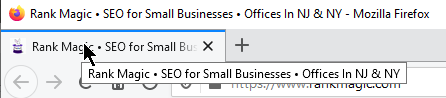
While meta tags are not visible on the page, two items in the HTML code of your page are very important: the page title and the description tag. The page title isn’t a heading on your page, but it acts as the headline for your listing in all search engines. So it’s a critical place to include your keywords. Google says keywords in your meta description tag don’t influence your ranking, but since this description often ends up in your search listings it has a direct impact on how likely a searcher is to click on your listing.
6) Image keyword optimization
Every image on your page provides two or three places to put your keyword phrases in front of the search engines without keyword stuffing your text content.
The image filename is most obvious. An image filename of img183572x6.jpg tells Google nothing. But one that’s got a keyword in it (like nj-real-estate-lawyer.jpg) can really help.
Alternate text is text describing the image for visually impaired visitors who have their computers read the page out loud. It’s a great place to show your keywords to Google.
And if an image acts as a clickable link to someplace else, a title attribute generates a little text box that pops up when the user hovers their mouse over the image. It’s meant to tell the user what’s at the other end of the link if they click it, and is another place you may be able to use a keyword.
7) URL structure
Your URL structure helps you in three ways.
It improves the user experience of your listings in Google:
Links can sometimes serve as their own clickable text of a link.
Here’s an example from Moz:
8) Schema code
Schema markup is a common short term for structured data, named after Schema.org, the website for structured data markup. It’s sometimes called structured data markup and it tells the search engines exactly what kind of information is on your website. It’s totally in the HTML code behind your website and doesn’t affect what visitors see on your site. If you’re a local service area business, it can be especially helpful to identify your location and service area for local searches.
You can easily check out your own schema code in this schema code validator. If it shows you don’t have schema code, it’s time to fix that.
Page and Domain Authority strongly impact your rankings. These are metrics developed by the folks at Moz that attempt to predict how well a given website will show up in search results. It’s based largely on the number and quality of other websites that link to you and is designed to correlate with Google’s internal PageRank scoring.
10) Local prominence
Prominence refers to how widely across the web you’re listed with a correct and consistent NAP (name, address, phone). It’s particularly important for small businesses to show up in local search results and in the Google Local 3-Pack. These listings are often called citations and citation management deserves ongoing attention from small local businesses. But don’t be misled by many of the common misconceptions about citations that are floating around.
Feel free to use our free tool to check on several dozen top citation sources to see how your own prominence looks.
Bottom Line
None of these are absolutely essential. But none of them can be ignored either. Where you rank is the result of all of these things (and more). Just do your best with as many of these as you can.
How’s your experience been with these issues? What other factors do you think deserve to be included? Start a discussion below.
Find this helpful? If so, please share it with the buttons on the left or the “Click to Tweet” above.
Past the basics, digital marketing is far from easy. Different channels, practices, and campaign types require their own skillsets and tools to tackle. What’s worse, some tools often come with hefty price tags that strain smaller budgets – sometimes needlessly so. We can’t address the former much, apart from offering our advice and services. But the latter we can help with by exploring the best digital marketing tools for small businesses.
What marketing tools do small businesses need?
First, let’s briefly establish what types of tools most small businesses will likely need. Then we’ll suggest an outstanding performer for each one and note alternatives you can consider.
#1 Website analytics tools
Analytics is an invaluable resource for any business, regardless of size.
Before all else, any and all marketing activities need website data to inform their course. How much traffic are you getting, and from where? What’s your bounce rate? How do visitors behave?
Knowing exactly how your website performs is crucial, as that’s where you ultimately want to bring and convert your audiences.
#2 A CRM
Similarly, a Customer Relationship Management (CRM) solution can offer immense help as you’re getting started. This software type records all customer interactions with your business, as the name suggests, collecting customer data and actionable information. You can benefit from this type of software quite substantially – from keeping customer information up to date to using it for email personalization.
#3 Local SEO tools
Next, most small businesses tend to target and rely on local audiences, so they need local SEO. We’ve written about this subject before, if you’d like to know, or brush up on, why local SEO is important.
Of course, much like its general SEO sibling, it also needs all the help from your tools it can get.
#4 SEO tools
SEO is a series of practices that greatly enhances online visibility.
On the subject of SEO, you can not neglect its broader variants either. SEO will offer organic traffic, enhance online visibility, and facilitate long-term growth by improving your search engine rankings.
You can practice basic SEO manually, but Backlinko finds that Google uses over 200 ranking factors. Attempting to cater to them all without specialized tools will often not go well, so digital marketing tools for small businesses can never exclude SEO.
#5 Keyword research tools
Still on SEO, as it holds that much value, keyword research tools are essential as they spearhead it. Targeting the right keywords will get your blog found and serve your content to eager audiences.
Should you want to engage in paid marketing, keyword research will also reveal overlaps with SEO and help the two synergize – letting you prioritize which keywords to bid on and which to chase organically.
#6 Email marketing tools
But beyond SEO, you will most likely also want to engage in email marketing. Not everyone will reach the “astounding 4,200% ROI” that HubSpot finds, but it’s still highly cost-effective.
However, email marketing also requires personalization, outreach timing, and more, making email marketing tools an excellent investment.
#7 Social media tools
Social media activities also come with similar requirements. You can’t safely ignore social media either, as they present an excellent opportunity to reach vast, engaged audiences.
Finally, even the smallest businesses need to ensure proper communications among staff. You cannot guarantee smooth operations if everyone isn’t on the same page at all times.
8 Best Digital Marketing Tools for Small Businesses
Having covered marketing tool types, now we can move on to specific suggestions. In order, you may consider the following.
#1 Google Analytics
Staring with analytics, one cannot recommend Google Analytics enough. This handy tool offers a wealth of actionable insights, including:
Traffic volume and traffic sources (direct, referral, organic search, etc.)
Keywords used to find you
Visitor behavior; dwelling time, pages visited, etc
The cost of its 360 plan is very steep, unfortunately, starting from $12,500 per month and $150,000 per year. However, you will most likely not need it as the free plan already offers a wealth of helpful analytics features.
Finally, it synergizes perfectly with Google Search Console (formerly Google Webmaster Tools) to truly let your website shine. Thankfully, Google Search Console is also a free service.
On to CRM solutions, HubSpot’s CRM may have caught your eye online before. This excellent solution offers such vital features as:
Customer database
Reporting dashboard
Pipeline management
Email tracking
Live chat
Most surprisingly, but thankfully for small businesses, it’s completely free. It also synergizes very well with HubSpot’s other marketing services, or “hubs,” should you need them. Price points are a bit complex if you do, however, so Tech.co’s HubSpot pricing guide should help.
For alternatives, if you can budget for them, you may also look into:
[Editor’s note: My personal favorite and the one I use is Pipeline CRM.]
#3 Google Business Profile
Next, digital marketing tools for small businesses need to address local SEO specifically. For this purpose, there’s nowhere better to begin than Google Business Profile (GBP).
Formerly Google My Business (GMB), this free listing service is the spearhead of all local SEO campaigns. It grants your business access to Google’s app ecosystem, most notably Google Maps, and it boosts your local search ranking. If you’d like to know precisely how to make the best of it, you may consult our article on local SEO.
Unlike the other tools on this list, GBP has no replacement. You may augment it, however, using:
On the subject of SEO, keywords are a fundamental part of it. Thus, to fully cover your bases, you may consider KWFinder, one of the best keyword research tools around.
KWFinder offers such features as:
Keyword analysis; SEO difficulty and search volume
Related and hidden keyword suggestions
Localize keyword results for local SEO
KWFinder comes with a free 10-day trial, after which you may opt for the affordable $29.90/month plan. If it doesn’t serve your needs or you want to explore your options, you may also consider:
[Editor’s note: my preference is Moz Pro (paid, starts at $99/month)]
#5 Ahrefs
But keywords are only a part of SEO, not its sum. Digital marketing tools for small businesses should thus always include broader SEO tools, which Ahrefs stands out among.
This comprehensive tool’s features include:
Website auditing tools
Competitor analysis tools
Rank tracking
A content explorer
A built-in keyword research tool
It does start at $99/month, but it compensates for it through its breadth of features and ease of use. Still, you may also want to explore its paid competitors, like:
Next, SEO aside, you will most likely need email marketing regardless of business size. You can’t ignore its excellent ROI or ability to bring you customers.
For this purpose, MailChimp remains by large the industry leader. Its pricing plans do come with list limitations, but you can consider upgrading as your lists grow. The free plan comes with a limit of 2,000 subscribers and 10,000 monthly emails but also has excellent features, like:
Email automation
A built-in marketing CRM
A creative assistant, alongside form and landing page tools
Chances are you may soon find this restricting, however. If so, the Essentials plan at $11/month offers some excellent value, adding:
A vast email template library
A/B testing tools
Delivery by time zone
Chat and email support
A new limit of 50,000 contacts and 500,000 emails per month
While relatively restrictive, MailChimp is still among the best digital marketing tools for small businesses. If you’re unhappy with it, you may look into alternatives like:
Moving on to social media, social media marketing does offer small businesses an excellent, albeit demanding, engagement channel. You may consider the world-famous Hootsuite to make your job much more manageable.
Hootsuite’s reputation is well-deserved, as they’re industry experts – producing insightful annual digital reports alongside We Are Social. Their social media marketing platform seeks to cater to these insights, offering:
A central social media management platform
Scheduling tools
Advanced reporting tools
Unfortunately, more specialized features are reserved for higher pricing plans, and the basic Professional plan starts at $49.00/month. If it doesn’t suffice for you, and you can’t budget for its Team plan ($129.00/month), you may consider alternatives like:
SocialPilot (basic Professional plan starts at $25.50/month)
[Editor’s note: you may also look into Buffer, which helps schedule social media posts on multiple platforms. It’s free for up to three platforms, and charges if you need more. This is the one I’ve chosen to use.]
#8 Slack
Finally, when all is said and done, even the smallest teams need efficient communication. For this vital purpose, you may consider Slack – one of the best digital marketing tools for small businesses out there.
Even in its free version, Slack comes with a wealth of valuable features like:
The synchronous communication platform that reduces email time waste
Only searching for the 10,000 most recent messages
Only allowing 1:1 calls
Limiting active integrations to 10 at a time
The Pro plan removes these restrictions for just $6.67/month, leaving you with an excellent communication tool. Still, if its interface doesn’t suit you, you may also consider:
RocketChat (free for up to 1.000 users, $3 per user per month for more and advanced features)
In closing
To conclude, digital marketing does require technology’s help to meet its increasing demands. Thankfully, the market continues to provide affordable digital marketing tools for small businesses to let them elevate their efforts. While brief, this list hopefully helped you get started.
About the author
Andrew Miller is a freelance digital marketer and copywriter with over a decade of experience in both fields. An avid SEO practitioner and a CRM enthusiast, he often authors content specifically for SMBs and local businesses.
If you found this helpful, please share it via the social media share buttons on the left or the Click-to-Tweet above.
Citation management is an important part of the local SEO services we offer to small businesses. There are several reasons every small business needs to pay attention to this.
7 benefits of good citation management
Broad Exposure
How widely are you known across the Internet?
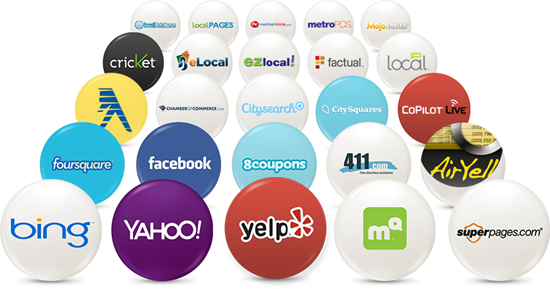
You need to make sure you’re listed and easy to find across the web at dozens of local search engines, directories, maps, mobile apps, and voice assistants like Alexa. This also helps Google, Yahoo & Bing to have more trust in who you are, what you do, and where you are.
Accuracy and Consistency
It can make sure your NAP (name address, phone) is consistent across all of those listings. Before working with us, a recent client was missing from more than a third of the top citation listings. Even worse, two listings had an incorrect address and 14 had their old company name. When this happens, Google has very low confidence in who or where you are. And that’s devastating to your chances of showing up in local searches.
Visible Reviews
Having reviews on multiple sites builds your reputation.
Having review stars show up in multiple places enhances your reputation. When you get a word-of-mouth referral, odds are that person will look you up by name before they call, just to check you out. When they do, your website should show up — but so will many of your citations, at places like Google My Business, Yelp, MerchantCircle, Facebook, and more. Some may show up that you’ve never heard of, like Clutch or TrustPilot. If all of those have review stars displaying in the search results, that increases the likelihood that person will want to do business with you.
Review Monitoring
We send our clients an email every time someone posts a new review for them. Responding to reviews promptly has been found to increase conversions and closed business. So it’s important to know about new reviews as they happen.
Suppressing duplicate listings helps search engines trust which is correct.
Duplicate Listing Monitoring
Duplicate and near-duplicate listings can confuse search engines, and that’s never a good thing. We alert our clients whenever we find a possible duplicate so they can check it out and suppress it if necessary.
Robust Business Information
Good citation management doesn’t just start with getting your NAP widely disseminated. All of those citation sources gather and reflect lots of information about your business:
Google is getting better and better at responding to what’s called vertical search. Proper citation management will promulgate information that can help you show up when people search for specific things like
Wheelchair accessible dentist near me
Local restaurant with lasagna
Woman-led wellness coach
Veteran-led SEO company
etc.
Structured data markup focuses Google on your essential information.
A Bonus
An added bonus to our citation management here at Rank Magic is schema code. That’s structured data markup in accordance with schema.org and it’s very helpful in terms of ranking highly in Google, Yahoo & Bing. We collect and maintain a lot of information about your business for your citations. That allows us to provide a simple script to add structured code to your website with a simple copy & paste.
How good is your citation management?
It’s easy to check! Just run a free scan to see whether your show up in about five dozen places across the web. And where you do show up, the scan will show your NAP and highlight any errors or inconsistencies. It will either give you peace of mind or demonstrate how badly you need citation management.
Local search rankings are critical to local businesses
If you’re a local business, how you rank in local search can make or break your business. If you’re not showing up in Google when people search for what you do, your competitors are eating your lunch. That’s why it’s important to understand how to improve local rankings in Google and stay competitive.
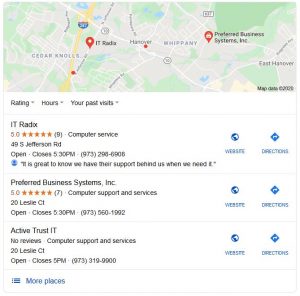
It’s important to understand that there are two different local rankings in Google: the Local 3-Pack and the organic listings. The 3-Pack is the map with (typically) three local businesses beneath it corresponding to map pin icons on the map. The organic listings are typically beneath the Local 3-Pack and are the most common rankings customers consider.
These two parts of a local search result are determined by different local SEO factors. What’s most important to show up in the Local 3-Pack isn’t the same as what’s most important to show up in the local organic results. Let’s take them one at a time.
Google’s Local 3-Pack
Ranking factors for the Local 3-Pack
#1 Google My Business
This is the most important factor here. Critical to success here is making sure your category is correct, that your NAP (name, address, phone) is consistent with what’s on your your website, and that you’ve filled out as much information as possible. This may be the most important step you can take to improve local rankings in Google.
Positive online reviews are next in line. Make sure you have reviews on your Google My Business page. And not just review stars, but informational reviews; Google considers review comments important. Get reviews on a good number of other sites, too. Facebook, Yelp, DexKnows, SuperPages and CitySearch are good ones. Also any vertical directories you’re listed on. You can suggest that delighted customers review at some of these places. You also need to monitor any reviews you get and respond to them whenever possible. A positive customer-focused response to a mediocre review can leave a very positive impression.

Citations that are consistent widely across the web gives Google confidence in your location and phone number. Consistency is critical because if a number of your listings have a previous address, some have a local number and others a toll-free number or fax number, Google isn’t confident which is right. If Google isn’t sure, it’s much less likely to rank you highly.
This relates to making sure your website is secure, fast, and thoroughly Google-friendly. Make sure keyword placement is appropriate so that Google can tell clearly what each page is all about, and studiously avoid keyword stuffing.
Your authority across the web informs Google about how important your website is. A commonly used measure of this is the Moz Domain Authority. It’s derived from a number of factors, the most important being your link profile: the number and quality of other websites linking to you.
Ranking factors for local organic listings
#1 On-page SEO
This is the same as #3 above for Local 3-Pack listings. It’s just more important for your organic ranking. It’s clearly indispensable for showing up in both parts of the search results.
#2 Domain Authority
See factor #4 above under the Local 3-Pack.
#3 Behavioral factors
A number of behavioral factors can affect your organic rankings in Google. They include the following.
Click through rate reflects the number of searchers exposed to your listing on a search engine results page (SERP) who actually click on your listing. They have looked at your page title and description and concluded that it’s a good match for what they’re looking for.
Mobile clicks to call are possible only for mobile searchers, since you can’t click to call on a computer. But when someone finds you in a search on their phone and clicks to call you, it’s a very concrete message to Google that your page is an excellent result for that search. The more that happens, the better.
Bounce rate is related to the click through rate. For either to happen, the searcher needs an impression – you need to show up on the SERP for their search. A bounce occurs when someone is on a SERP with your listing and clicks on you but immediately bounces back to the search results to pick someone else instead of exploring your site. That’s a negative ranking factor. They clearly did not like your page or determined it wasn’t a good match for what they were looking for. And Google understands that.
Time onsite is something that Google tracks and most people aren’t aware of it. When someone clicks on your site and stays there awhile, perhaps exploring additional pages on your website, that tells the search engines that your site was an excellent match for that search. The longer they spend on your site, the more good information they must’ve found there. That makes you look really good in Google’s eyes, and will help you rank higher in the future.
#4 Reviews and citations
See#2 under the Local 3-Pack above. These are important to your rankings in both the organic results and the Local 3-Pack.
To improve local rankings in Google, you really need to pay attention to every one of the above ranking factors.
[Updated 2/12/21 to include a link to an excellent Forbes article about NAP consistency.]
If you found this helpful, please share it with the buttons on the left or the Click-to-Tweet above.
Facing challenges with your local search rankings? Start or join a discussion below.
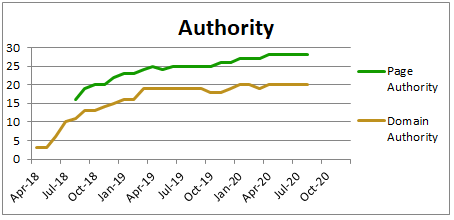
We typically track the Page Authority for our clients’ home page as well as their overall Domain Authority.
Let’s start at the top and explain that Domain Authority is a metric developed by the folks at Moz that attempts to predict how well a given website will show up in search results. It’s based largely on the number and quality of other websites that link to the domain it’s reporting on.
What’s Page Authority?
There is a separate measure called Page Authority for each web page on your site to predict how well each page will show up in search results. Both authority measures use many factors and are tweaked by machine learning to approximate as closely as possible actual search results.
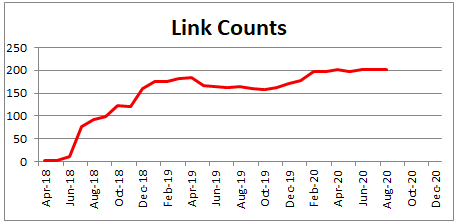
We track the growth of your inbound link counts and report it to our clients regularly.
You can get an idea of how many other websites link to you with the Moz Domain Authority tool linked above. In terms of the actual number of links to your site, we subscribe to Moz and report to our clients monthly. But you should be able to find how many links you have in the Google Search Console.
What’s a good domain authority score?
Across the web, an average Domain Authority score is considered to be something in the 40-50 range. But understand that this “average” includes both small businesses and huge businesses. For your own purposes, I don’t recommend that you worry about what’s “average”. In order to show up on the first page of Google for your keyword phrases, you probably need a Domain Authority in the same ballpark as those sites that are currently showing up on the first page.
Moz does excellent reporting of domain and page authority.
I recommend that you aim to achieve both Page Authority and Domain Authority higher than your direct competitors. For many of our small business clients, that may be as low as the mid-20s.
Tracking your Domain Authority
Links come, and links go. If you’re doing active link building well on your site, your Domain Authority should continue to improve. Be aware that if you add back links without regard to the quality, more links could conceivably cause your Domain Authority to drop.
If you have a new website or have just begun to work on increasing your authority, you might want to track it on a weekly basis. Once you have a good process in place, tracking your Domain Authority on a monthly basis should be adequate.
If you are just starting out, it might be easiest to submit a listing for yourself in a number of general-purpose directories. They’re not the most powerful links, but they are among the easiest to obtain. Generally I don’t recommend paying for featured listings in directories; the incremental value is not typically there.
But do be sure to fill out your listings as much as possible. The more explicit and robust the listing, the more value it provides. If it allows you to enter things like your logo, or your business hours, always do that.
For many businesses, vertical directories are useful. There are a number of directories that focus on listing specific niches like lawyers, doctors, dentists, plumbers, landscapers, and so forth. These usually require a one-time or ongoing fee, but many of these have high authority themselves, making them powerful sources of links for you.
Explain the benefits of linking to your site when asking for a backlink.
Existing relationships
Next, I typically encourage people to focus on other relationships. If you belong to any professional associations or networking organizations, make sure that they link to you.
Any vendors you use benefit from your success; that gives them an incentive to see you do well, and linking to you will help that. Perhaps customers of yours (if businesses) would be willing to link to you – especially if they’re delighted with your services.
Look for any other businesses that refer customers to you, and any other businesses that you refer customers to. Those businesses obviously value your connection and are more inclined to be willing to link to you.
Reciprocal links
Don’t be afraid of reciprocal links – those where you link to the person who links to you. While they’re not quite as powerful as one-way inbound links, they are often very natural. And the offer of a link from you which will help the other business rank better in search can provide just the necessary incentive for them to agree to link to you.
Consider writing user-generated content for the sake of the backlink.
User generated content
If you have a flair for words, another source of inbound links can be “user generated content“. Guest blogging is quite popular; you write a unique article for someone else’s blog and usually receive a link back from the “about the author” blurb at the end. This has been somewhat over utilized of late and it’s not quite as valuable as it once was.
Caution
DON’T use paid links, link farms, and other link schemes to increase domain authority because they violates Google’s rules and can sabotage your search rankings.
DON’T value quantity over quality. A single powerful link can help you more than many low quality links. DO consider the authority of sites you seek links from. I suggest finding link partners that have at least an equal Domain Authority to you or better.
What’s been your experience? If you’ve been working on improving your Domain Authority, how happy are you with the investment of time and attention it takes? How successful have you been? Let us know in the comments below.