
• Skip to primary navigation
  • Skip to main content
  • Skip to primary sidebar
  • Skip to footer
  • facebook icon
  • twitter icon
  • linkedin icon
(973) 887-0778
Rank Magic

Rank Magic

SEO for small and very small businesses.

  • Home
  • About Us
    • Why Rank Magic?
    • The Rank Magic SEO Team
    • Selected Clients
    • Testimonials from Some of Our Clients
    • Strategic Partners
    • Business Presentation on Internet Visibility
    • Contact Us
    • SEO Ethics
    • NJ SEO Company – Small Business SEO & Local SEO Experts
  • SEO
    • SEO is an Essential Part of Internet Marketing
    • Our SEO Services Help More Customers Find You
    • The SEO Process Explained: How SEO Works, Step-by-Step
    • Keyword Selection
    • SEO Recommendations
    • All About Search Engine Submissions
    • Monitoring SEO Results
    • Link Building for Ranking Authority
    • Local Search Optimization
    • Canonicalization
    • SEM Pay Per Click Ads
  • Local SEO
  • SEO Blog
  • Contact Us
Home » SEO practices

SEO practices

July 2, 2026 by Bill Treloar 6 Comments

8 Best Digital Marketing Tools for Small Businesses

On July 2, 2026 / marketing, SEO practices / 6 Comments

An illustration of a computer screen that reads Past the basics, digital marketing is far from easy.  Different channels, practices, and campaign types require their own skillsets and tools to tackle. What’s worse, some tools often come with hefty price tags that strain smaller budgets – sometimes needlessly so. We can’t address the former much, apart from offering our advice and services. But the latter we can help with by exploring the best digital marketing tools for small businesses.

Choosing the right digital marketing tools isn’t just about automating repetitive tasks—it helps small businesses compete with larger brands on a limited budget. The best software should simplify everyday marketing activities, provide measurable insights, and scale alongside business growth. Rather than investing in dozens of platforms, many small businesses benefit most from selecting tools that integrate well with each other and cover essential areas like SEO, content creation, email marketing, analytics, and customer relationship management.

What marketing tools do small businesses need?

First, let’s briefly establish what types of tools most small businesses will likely need. Then we’ll suggest an outstanding performer for each one and note alternatives you can consider.

.

#1 Website analytics tools

A pie chart of traffic sources on a laptop screen.
Analytics is an invaluable resource for any business, regardless of size.

Before all else, any and all marketing activities need website data to inform their course. How much traffic are you getting, and from where? What’s your bounce rate? How do visitors behave?

Knowing exactly how your website performs is crucial, as that’s where you ultimately want to bring and convert your audience.

#2 A CRM

Similarly, a Customer Relationship Management (CRM) solution can offer immense help as you’re getting started. This software type records all customer interactions with your business, as the name suggests, collecting customer data and actionable information.  You can benefit from this type of software quite substantially – from keeping customer information up to date to using it for email personalization.

#3 Local SEO tools

Next, most small businesses tend to target and rely on local audiences, so they need local SEO. We’ve written about this subject before, if you’d like to know, or brush up on, why local SEO is important.

Of course, much like its general SEO sibling, it also needs all the help from your tools it can get.

#4 SEO tools

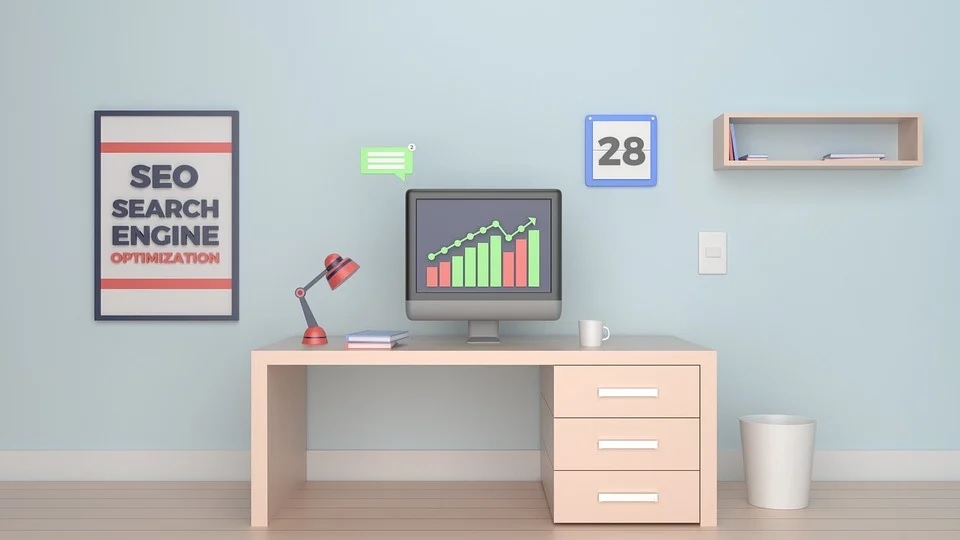
An illustration of a computer on a desk next to a sign that reads
SEO is a series of practices that greatly enhances online visibility.

On the subject of SEO, you can not neglect its broader variants either. SEO will offer organic traffic, enhance online visibility, and facilitate long-term growth by improving your search engine rankings.

You can practice basic SEO manually, but Backlinko finds that Google uses over 200 ranking factors. Attempting to cater to them all without specialized tools will often not go well, so digital marketing tools for small businesses can never exclude SEO.

#5 Keyword research tools

Still on SEO, as it holds that much value, keyword research tools are essential as they spearhead it. Targeting the right keywords will get your blog found and serve your content to eager audiences.

Should you want to engage in paid marketing, keyword research will also reveal overlaps with SEO and help the two synergize – letting you prioritize which keywords to bid on and which to chase organically.

#6 Email marketing tools

But beyond SEO, you will most likely also want to engage in email marketing. Not everyone will reach the “astounding 4,200% ROI” that HubSpot finds, but it’s still highly cost-effective.

However, email marketing also requires personalization, outreach timing, and more, making email marketing tools an excellent investment.

#7 Social media tools

Social media activities also come with similar requirements. You can’t safely ignore social media either, as they present an excellent opportunity to reach vast, engaged audiences.

You may combine email and social media with SEO – ideally with the proper consolidated tools for easier management.

#8 Communication tools

Finally, even the smallest businesses need to ensure proper communications among staff. You cannot guarantee smooth operations if everyone isn’t on the same page at all times.

To stress this point further, consider Oak’s communication statistics – where, among others, they find that:

  • 39% of surveyed employees believe that people in their organization don’t collaborate enough
  • 44% of employees want wider adoption of internal communication tools
  • 33% of employees said a lack of open, honest communication has the most negative impact on employee morale
8 Best Digital Marketing Tools for Small Businesses

Click To Tweet

8 Best Digital Marketing Tools for Small Businesses

Having covered marketing tool types, now we can move on to specific suggestions. In order, you may consider the following.

#1 Google Analytics

Staring with analytics, one cannot recommend Google Analytics enough. This handy tool offers a wealth of actionable insights, including:

  • Traffic volume and traffic sources (direct, referral, organic search, etc.)
  • Keywords used to find you
  • Visitor behavior; dwelling time, pages visited, etc.

The cost of its 360 plan is very steep, unfortunately, starting from $12,500 per month and $150,000 per year. However, you will most likely not need it as the free plan already offers a wealth of helpful analytics features.

Finally, it synergizes perfectly with Google Search Console (formerly Google Webmaster Tools) to truly let your website shine. Thankfully, Google Search Console is also a free service.

For alternatives, you may consider:

  • SEMrush
  • BuzzSumo
  • Heap Analytics
  • Cyfe
  • Crowdbooster

#2 HubSpot

On to CRM solutions, HubSpot’s CRM may have caught your eye online before. This excellent solution offers such vital features as:

  • Customer database
  • Reporting dashboard
  • Pipeline management
  • Email tracking
  • Live chat

Most surprisingly, but thankfully for small businesses, it’s completely free. It also synergizes very well with HubSpot’s other marketing services, or “hubs,” should you need them. Price points are a bit complex if you do, however, so Tech.co’s HubSpot pricing guide should help.

For alternatives, if you can budget for them, you may also look into:

  • SalesForce, the industry leader
  • Zoho
  • SAP
  • Microsoft Dynamics
  • Oracle CX
  • [Editor’s note: My personal favorite and the one I use is Pipeline CRM.]

#3 Google Business Profile

The logo of Google Business Profile (GBP), formerly Google My Business (GMB).Next, digital marketing tools for small businesses need to address local SEO specifically. For this purpose, there’s nowhere better to begin than Google Business Profile (GBP).

Formerly Google My Business (GMB), this free listing service is the spearhead of all local SEO campaigns. It grants your business access to Google’s app ecosystem, most notably Google Maps, and it boosts your local search ranking. If you’d like to know precisely how to make the best of it, you may consult our article on local SEO.

Unlike the other tools on this list, GBP has no replacement. You may augment it, however, using:

  • Other citation sites, like Yelp, Foursquare, and Facebook
    [Editor’s note: we offer citation management services to our clients.]
  • Local citation checker tools, like Moz’s local listing checker
  • Link checker tools for your local links, such as Ahref’s broken link checker

#4 KWFinder

The home page of KWFinder, a keyword research tool.On the subject of SEO, keywords are a fundamental part of it. Thus, to fully cover your bases, you may consider KWFinder, one of the best keyword research tools around.

KWFinder offers such features as:

  • Keyword analysis; SEO difficulty and search volume
  • Related and hidden keyword suggestions
  • Localize keyword results for local SEO

KWFinder comes with a free 10-day trial, after which you may opt for the affordable $29.90/month plan. If it doesn’t serve your needs or you want to explore your options, you may also consider:

  • Google Keyword Planner (free)
  • Keyword Surfer (free)
  • SEMscoop (freemium, paid version starts at $9/month)
  • Ubersuggest (freemium, paid version starts at $29/month)
  • SpyFu (paid, starts at $33/month)
  • [Editor’s note: my preference is Moz Pro (paid, starts at $99/month)]

#5 Ahrefs

The home page of Ahrefs, an SEO tool.But keywords are only a part of SEO, not its sum. Digital marketing tools for small businesses should thus always include broader SEO tools, which Ahrefs stands out among.

This comprehensive tool’s features include:

  • Website auditing tools
  • Competitor analysis tools
  • Rank tracking
  • A content explorer
  • A built-in keyword research tool

It does start at $99/month, but it compensates for it through its breadth of features and ease of use. Still, you may also want to explore its paid competitors, like:

  • Majestic (starts at $50/month)
  • Moz Pro (starts at $99/month)
  • SEMrush (starts at $99/month)

Or, if you’re now getting started with SEO, you may begin with free alternatives like:

  • MozBar
  • Neil Patel’s SEO Analyzer
  • Ahrefs’ SEO toolbar

#6 MailChimp

The homepage of MailChimp, offering to “do it all” for marketing campaigns.Next, SEO aside, you will most likely need email marketing himregardless of business size. You can’t ignore its excellent ROI or ability to bring you customers.

For this purpose, MailChimp remains by large the industry leader. Its pricing plans do come with list limitations, but you can consider upgrading as your lists grow. The free plan comes with a limit of 2,000 subscribers and 10,000 monthly emails but also has excellent features, like:

  • Email automation
  • A built-in marketing CRM
  • A creative assistant, alongside form and landing page tools

Chances are you may soon find this restricting, however. If so, the Essentials plan at $11/month offers some excellent value, adding:

  • A vast email template library
  • A/B testing tools
  • Delivery by time zone
  • Chat and email support
  • A new limit of 50,000 contacts and 500,000 emails per month

While relatively restrictive, MailChimp is still among the best digital marketing tools for small businesses. If you’re unhappy with it, you may look into alternatives like:

  • SendinBlue
  • Constant Contact
  • Omnisend

#7 Hootsuite

The home page of HootSuite, a social media marketing tool.Moving on to social media, social media marketing does offer small businesses an excellent, albeit demanding, engagement channel. You may consider the world-famous Hootsuite to make your job much more manageable.

Hootsuite’s reputation is well-deserved, as they’re industry experts – producing insightful annual digital reports alongside We Are Social. Their social media marketing platform seeks to cater to these insights, offering:

  • A central social media management platform
  • Scheduling tools
  • Advanced reporting tools

Unfortunately, more specialized features are reserved for higher pricing plans, and the basic Professional plan starts at $49.00/month. If it doesn’t suffice for you, and you can’t budget for its Team plan ($129.00/month), you may consider alternatives like:

  • Zoho Social (Standard plan starts at $10/month
  • MeetEdgar (Edgar Lite starts at $19/month)
  • SocialPilot (basic Professional plan starts at $25.50/month)
[Editor’s note: you may also look into Buffer, which helps schedule social media posts on multiple platforms. It’s free for up to three platforms, and charges if you need more. This is the one I’ve chosen to use.]

#8 Slack

The home page of Slack, a communication tool.Finally, when all is said and done, even the smallest teams need efficient communication. For this vital purpose, you may consider Slack – one of the best digital marketing tools for small businesses out there.

Even in its free version, Slack comes with a wealth of valuable features like:

  • The synchronous communication platform that reduces email time waste
  • Simple, efficient data sharing
  • Integrations with over 1,500 apps

It does have some limitations, however, such as:

  • Only searching for the 10,000 most recent messages
  • Only allowing 1:1 calls
  • Limiting active integrations to 10 at a time

The Pro plan removes these restrictions for just $6.67/month, leaving you with an excellent communication tool. Still, if its interface doesn’t suit you, you may also consider:

  • Discord (free, $9.99/month for advanced features)
  • Google Chat (Free to Gmail users)
  • RocketChat (free for up to 1.000 users, $3 per user per month for more and advanced features)

How to Choose the Right Digital Marketing Tools for Your Business

Every small business has different marketing priorities, so the best digital marketing tool depends on your goals rather than the number of available features. Businesses focused on improving search visibility should prioritize SEO and keyword research tools, while companies generating leads may benefit more from email marketing automation and CRM platforms. Social media-focused brands should look for scheduling and analytics capabilities that save time without sacrificing engagement.

It’s also worth considering how well each platform integrates with your existing workflow. Choosing tools that connect with your website, customer database, and analytics platform can eliminate repetitive manual tasks and improve reporting accuracy. As your business grows, selecting scalable solutions can help avoid the cost and disruption of switching platforms later.

In closing

To conclude, digital marketing does require technology’s help to meet its increasing demands. Thankfully, the market continues to provide affordable digital marketing tools for small businesses to let them elevate their efforts. While brief, this list hopefully helped you get started.

The most effective digital marketing strategy combines several complementary tools rather than relying on a single platform. Regularly reviewing your marketing performance and adapting your technology stack as your business evolves can help maximize return on investment while keeping your campaigns efficient and data-driven.

About the author

Andrew Miller is a freelance digital marketer and copywriter with over a decade of experience in both fields. An avid SEO practitioner and a CRM enthusiast, he often authors content specifically for SMBs and local businesses.

If you found this helpful, please share it via the Click-to-Tweet above.

March 20, 2026 by Bill Treloar Leave a Comment

Law Firm SEO: A Case Study

On March 20, 2026 / SEO practices / Leave a Comment


Here’s a quick case study of my work with Laura Anastasia Brown, a tax lawyer in Massachusetts.  It starts with a discussion of the attorney’s pain points that drove her to seek an SEO consultant, covers what we did for her, and discusses the results achieved according to Laura’s own evaluation.

Circumstances

Inadequate Traffic

Responses from Laura’s previous website were way down.  She reported that the volume of calls had really decreased, and specifically that clients she considered to be a good match were not calling.

Previous SEO ConsultantLaura's previous SEO efforts hadn't gone well.

Laura had received some suggestions from an SEO consultant, but thinks she didn’t follow through sufficiently.  She explained that the SEO consultant would check in with her annually (!), and make some suggestions.

She said “I didn’t want to deal with it at all. Maybe if I had understood the specifics about why he was asking me to do these things, I would have paid attention. It wasn’t until I met Bill that I understood exactly what SEO was and how my website content affected my rankings. Now I pay attention!”

Lack of Visibility

Most local searches are done via voice search on a phone. If your website isn't mobile-friendly, you stand to lose many clients or customers.The client’s website was very old and not cell phone friendly; she recognized that she needed to have it redesigned.  She recognized that most clients found her from searching online and she needed to significantly increase the number who found her that way.  Her goals were to have an SEO consultant work seamlessly with her web design team to achieve an increase in her business from the website.

Looking for a New Team

She wanted a brand-new team but had no idea that SEO consultants and website designers were usually separate entities.  As she looked for someone new to help with her website she found the process frustrating.  She complained that “No one explains what goes on behind the curtain”.

Laura felt that she went to law school, not computer school, and wasn’t interested in becoming a web design or SEO expert, but still wanted to have a general idea of what was going on.

Marketing Consultant

Digital marketing is important for growing your firm.Laura explains that she had time during COVID to really look at her website and marketing.  She interviewed a number of people about developing a new website and creating a social media presence, but nothing felt right to her.  Someone  referred her to Jackie Zuk at Next On Scene who she says was amazing for her social media campaign, and Jackie’s professional photos would be perfect for her new website.

Referral to SEO Consultant

Jackie referred her to Rank Magic to consult on her SEO.  Laura says that “Bill conducted an SEO audit of my website with me over Zoom and I felt very comfortable with him.  I especially appreciated that he explained everything about SEO to me – the who, what, where, when & why – in plain English.  I finally understood what the big fuss was about SEO and why it was so important!.  Bill explained his charts and analysis in plain English, and I finally understood SEO recommendations.”

Based on that, she felt comfortable hiring me as her SEO consultant.

Referral for Web Design and Hosting

Laura asked me for a reference for a new website designer, and I referred her to a few people I’ve worked with successfully.  She explains “I hired Tag Online after a conversation with the owner, Amy Gideon. I figured if my SEO consultant hired them, they must be great, and they are.”

Laura has since been very pleased with them and their work.

Cautionary Warning

A previous SEO/website consultant warned her that an updated website would cause a sharp decrease in rankings and it could take a year to recover. But she felt she had to do something because her old website wasn’t doing the job.  She swallowed hard and took the leap.

Actions

Tax law can be complicated, and Laura needed o be found by Massachusetts filers who've encountered difficulty. Rank Magic made that happen.Keyword Research

Based on discussions with Laura, I began with keyword research, identifying the kinds of searches her potential clients were using most often.  Laura took that research and after a discussion and lots of question she identified the most important search terms that she needed to show up for.  Those are the ones we would optimize the appropriate pages on her website for.

Baseline Reporting

Based on that, I presented and explained a baseline report with charts representing strengths and weaknesses of the website before making any SEO changes.  This included detailed keyword rankings compared with competitors, inbound link authority, and a technical site crawl outlining a number of technical coding issues for the web designer to address.

Addressing the Cautionary Warning

While the redesign was in process over at TAG Online I wanted to address Laura’s concern about the website redesign causing a severe drop in rankings, I asked them to ensure that all old URLs were permanently redirected to her new ones to retain as much as possible of the link authority they’d earned.  That effort was quite successful.

On-Page Optimization Recommendations

I developed detailed written recommendations of what needed to be included or improved on the website to be optimized for the keywords Laura chose.

Some responsibilities fell to her in terms of content on the pages, and other responsibilities fell to her web designers for coding issues.  I also suggested Laura add a blog to her website and add to it regularly.

Off-Page Optimization

Online business listings or citations on sites like these are an important part of off-page optimization.I began working on Laura’s external local SEO by creating detailed information and
citations across several dozen local search engines, online directories, maps, mobile apps, and voice apps.

I also created listings for her on specialized niche directories, blog directories, and local directories, and recommended to Laura some directories that required her to submit herself.

Reporting

Web marketing grade — just one of the items I report to Laura.I’ve been sending Laura at least two reports a month showing her ranking progress, competitive standing among the top law firms in her practice area, traffic volume, and a number of technical website performance metrics.

She reports; “Bill makes everything so easy and he is always available for a conversation. He doesn’t just email me some computer charts and spreadsheets containing monthly results that make my eyes glaze over, like other SEO consultants. He actually cares if his clients understand and that he is meeting and exceeding their expectations. This is what I attempt to do with my own clients and it is nice to be on the receiving end.”

Results

Authority

By the end of the first year, her inbound link count had increased by 325%, improving her authority in the eyes of search engines.

Visibility

Her search traffic rose from a low of about 50 visits per month to an average of 150 visits per month.

Competing with some large Boston law firms, she’s achieved top-two rankings in Google for searches like

  • Massachusetts tax attorney
  • Massachusetts IRS lawyer
  • Massachusetts tax law attorney
  • nonprofit tax attorney in Massachusetts
  • and more.

Focused Traffic

Laura Brown discusses the results of our SEO propject forher.She notes that blog posts have noticeably increased traffic for important focus areas of her practice without having to make wholesale changes to her website.  For example, she’s looking to grow the nonprofit work she does and reports “I have noticed more emails and calls from non-profit organizations seeking tax advice, which is great.” These include charities, trade organizations, sports organizations, civic leagues, social welfare, and political organizations.

With respect to her blog, Laura writes “Like all successful business owners, I am always adjusting my business model in response to changing market conditions, e.g., Congress passing a new tax law, President Biden hiring thousands of IRS Agents and auditors, DOGE laying off thousands more at the IRS.  I find that the blog allows me to change my online advertising quickly.”

Overall Client Evaluation

Increase in Business

Laura reports a very large increase in inquiries from potential clients, and nearly all of them hire her during the consultation.  Laura says “Before hiring Rank Magic, I’d get my share of random calls/emails from folks that clearly didn’t need my particular services and I wondered why they were calling me, instead of another attorney.  That seldom happens now.”

She says she often receives complements from clients telling her that her website shows up “everywhere”.

Media Attention

Not long after Laura’s on-page optimization was complete, she was contacted and interviewed by both the 6:00 news on WHDH Channel 7 News in Boston and quoted in an article in Massachusetts Lawyers Weekly.  She attributes this media coverage as a direct result of our work.

Overall Impressions

Laura complimented me on my professionalism, my communication in plain English without jargon, and getting right to the point clearly and without confusion.

She was surprised how quickly we got her to the top of the rankings for her practice area and that we that avoided the loss of rankings that had been predicted.

Laura Brown, Massachusetts tax attorney.She writes “I feel much better about my online presence now. TAG Online and Rank Magic have taken care of me and I am so grateful. Bill made it easy to understand what SEO is, why it’s important, and patiently answered every question I had.  I had no idea it was so involved but he explained what was going on in plain English.  I highly recommend him to other solo attorneys and small law firms.  He is a great fit; one of his children is an attorney so he gets us.  Attorneys always put their client’s needs first and their own needs way down the list.  Bill made it so easy for me to get this project done. I was dreading it and putting it aside for so long.  He made it pleasant with fantastic results!”

August 19, 2024 by Bill Treloar Leave a Comment

The FTC Bans Fake Reviews – What You Need to Know

On August 19, 2024 / SEO practices, Uncategorized, user experience / Leave a Comment

Understanding the New FTC Rule on Fake Reviews and Endorsements

The FTC has issued a rule banning fake online reviews.As a small business owner, you might have heard about the new rule from the Federal Trade Commission (FTC) banning fake reviews and endorsements. The new rule goes into full effect in mid-October, 2024.

This rule is super important for anyone who relies on online reviews to attract customers. Let’s break it down in a way that’s easy to understand and see how it might affect your business.

What’s the New Rule About?

The FTC’s new rule is all about cracking down on fake online reviews and misleading product or service endorsements. Essentially, it aims to ensure that all reviews and endorsements you see online are genuine and not paid for or fabricated. This means no more fake five-star reviews or influencers promoting products they’ve never used.

Why Should You Care about Fake Reviews?

Avoid fake reviews. The FTC has banned them and the fines are significant.As a small business owner, your reputation is everything. Genuine reviews can help build trust with potential customers, while fake reviews can do the opposite. Here’s why this rule matters to you:

  • Trust Building: Authentic reviews help build trust with your customers.
  • Fair Competition: Ensures a level playing field where businesses compete based on the quality of their services, not fake reviews.
  • Legal Compliance: Avoid hefty fines and penalties by staying compliant with the new rule.

Key Points of the Rule

Here are some of the main aspects of the new FTC rule:

  • No Fake Reviews: It’s illegal to post fake online reviews or pay someone to write a fake review.
  • Clear Disclosures: If you’re paying someone to write a review or endorse your product, it must be clearly disclosed.
  • Penalties: Businesses that violate these rules can face significant fines and penalties. Fines can exceed $50,000 per violation.
The FTC has banned fake reviews — what you need to know.

Click To Tweet

How to Stay Compliant

Staying on the right side of this rule is easier than you might think. Here are some tips:

  • Encourage Genuine Reviews: Ask your happy customers to leave honest reviews.
  • Avoid Paying for Reviews: Don’t pay for reviews or offer incentives in exchange for positive feedback.
  • Be Transparent: If you’re working with influencers or reviewers, make sure they disclose their relationship with your business.

Benefits of Genuine Reviews

Make it easy for delighted customers to review you.Genuine reviews can do wonders for your business. Here’s how:

  • Build Credibility: Real reviews from real customers build trust and credibility.
  • Improve SEO: Search engines love fresh, authentic content, which can help improve your search rankings.
  • Learn From Customer Insights: Honest feedback from your customers can provide valuable insights into what you’re doing right and where you can improve.

What If You’ve Used Fake Reviews?

If you’ve used fake reviews in the past, don’t panic. Here’s what you can do:

  • Remove Them: Take down any fake reviews from your website and ask review platforms (like Google or Yelp) to do the same.
  • Apologize and Move Forward: If necessary, issue a public apology and commit to using only genuine reviews moving forward.
  • Educate Your Team: Make sure everyone in your business understands the importance of genuine reviews and the new FTC rule.

The Bottom Line

The new FTC rule on fake reviews and endorsements is a big step towards ensuring transparency and fairness in online reviews. As a small business owner, embracing this rule can help you build a stronger, more trustworthy relationship with your customers. Remember, honesty is the best policy, and genuine reviews are worth their weight in gold.

Stay compliant, encourage honest feedback, and watch your business thrive!

If you found this helpful, please share it with the buttons on the left or the Click-To-Tweet above.

Your thoughts and opinions are welcome. Join the discussion in comments below.

December 22, 2022 by Bill Treloar Leave a Comment

Do Online Reviews Matter For a Small Business?

On December 22, 2022 / SEO practices / Leave a Comment

Do online reviews matter?  I get a lot of questions about online reviews, both from clients and others.

  • Often I’m asked whether online reviews matter at all.
  • Sometimes people wonder if customers are likely to write reviews for them.
  • And whether review readers trust them.
  • And if asking for reviews can hurt them.
  • Or whether asking for reviews might encourage negative reviews.

I thought it was time to put together kind of an FAQ about some of the most frequent online review questions I hear.

How important are reviews for my small business?

Review stars are valuable assests for your authority.Reviews can be very important for a local small business. Three important reasons are:

  1. People do read reviews.
  2. Not only do they read them, but they trust them.
  3. Reviews can be an important search ranking signal, helping move you up (or down) in search results.

Do customers really read reviews?

Moz recently conducted a study that revealed a full 96% read reviews, at least occasionally. In fact, more than half of people read online reviews at least weekly!  If half of your potential customers are reading your reviews, obviously that makes your reviews pretty important.
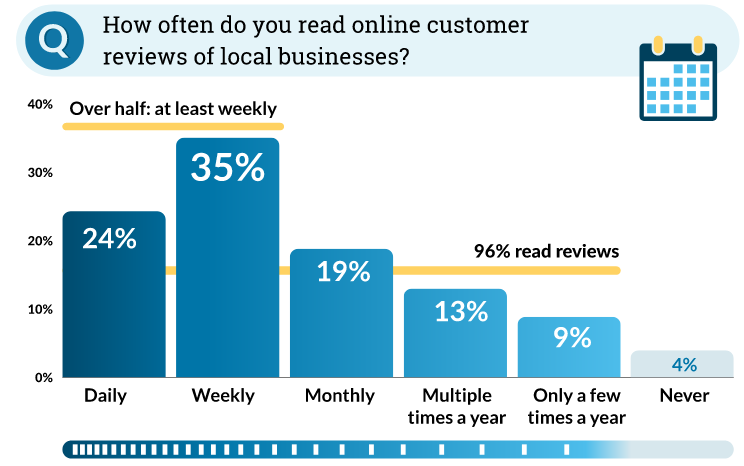
96% of people read reviews of companies and products.
From the Moz study of online review behavior.

Do people trust reviews?

Do online reviews matter if people don’t trust them?  I’ve been asked that by some skeptical business owners. But people do trust them!  86% of people consider reviews at least somewhat important when considering a business.  And fully a third of consumers consider reviews to be the single most important factor when deciding whether to patronize a business. Another study showed that 58% of customers would pay more or travel further to deal with a company with good reviews.
Enthusiasm is contagious.A survey by Website Builder found that 97% of consumers say the online reviews they read influence their purchasing decisions and 84% trust online reviews as much as recommendations from friends and family.

How many reviews do I need?

Opinions on this are all over the map.  Some sources say you need at least five reviews to show up. Others say you need at least 100 reviews to be trusted. But a lot depends on the size of your company and your scope.
A national eCommerce brand needs more reviews than a local store or business. My advice is to check your competitors that are showing up on the first page or two of Google and target more reviews than they have.
Do online reviews matter for a small business?

Click To Tweet

How many review stars do I need?

9 of 10 people trust online reviews. So does Google.Most sites that collect reviews display your average star rating.  Almost all are on a scale of 1 to 5 stars. The sweet spot seems to be somewhere between 4.2 and 4.8 stars.  That’s because some consumers are suspicious of a straight five-star rating, thinking that perhaps the business is supporting fake reviews. In fact, Yelp found that more than 70% of people would avoid a business if they thought the business had fake reviews or was offering compensation for good reviews.  On the other hand, anything less than 3 stars is probably no giving anyone much confidence in your business.

What percentage of customers write reviews?

Make it easy for delighted customers to review you.Moz found that only 14% of customers never write reviews. In fact, more than 40% write reviews at least once a month.  So don’t be shy about asking your customers to write reviews for you. Many of them will be happy to do so.

Website Builder found that 5-10% of customers typically write reviews. Presumably those are customers who’ve not been explicitly asked to write a review.  Other studies have found that up to 72% of customers will write a review if they are asked to do so.

How can I get more online reviews for my small business?

Digital marketingIf online reviews matter for your business, you obviously want more of them. And the good news is that If asked, more than half of your customers will usually write a review.

The top reason customers don’t review your business is because they forget to, not because they don’t want to. So it’s a good idea to follow up if they haven’t written a requested review within a week .

But don’t try to game the system. Half of consumers lose trust if it looks like owners or employees are reviewing their own business.  And many review sites use semantic analysis to identify such self-serving reviews and weed them out.

Which review site is best for a local small business?
Google Business Profile is a critical place for online reviews.People tend to read (and write!) more reviews on Google than anywhere else.  Online reviews matter the most on Google as a result. So that’s where you should focus mostly.  But not entirely, because other review sites get a fair amount of exposure, too.

Should I ask only for Google reviews?

Absolutely not.

When someone receives a word of mouth referral to you, they almost always look you up online before reaching out to you.  Your Google Knowledge Card ought to show up, and your website, of course.

But other sites will show up too, like Facebook, Yelp, Better Business Bureau, YellowPages, Judy’s Book, and others.  When they do, you want gold review stars there.  The gold color makes the review stars very noticeable, and the more good review stars people see on other sites for you, the more likely they are to trust you.

What sites are good for reviews besides Google?
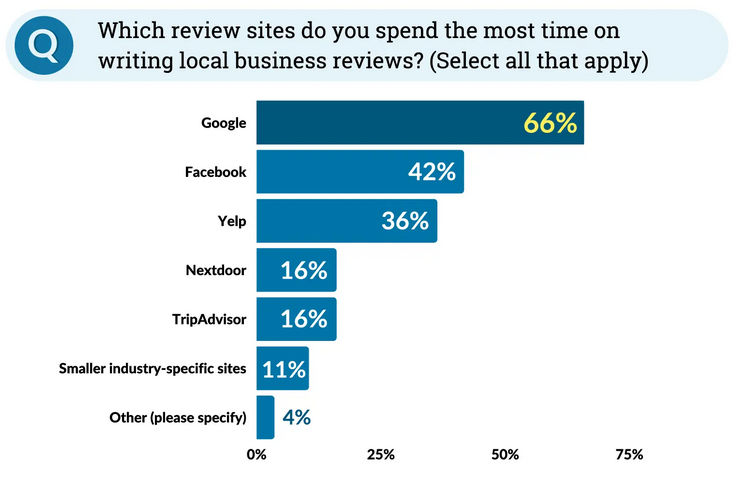
It's good to have reviews on multiple sites.

Should I respond to reviews?

Always respond to reviews!

I’ve seen reports that 90% of people are influenced to at least a a moderate by owner responses to reviews.  Also, a survey shows that 63% of consumers will update their negative review or low-star rating once an owner responds to resolve their complaint.

What if I get a bad online review?

An occasional negative review is inevitable.  Admittedly, they’re disappointing to see, and you can’t be blamed for wanting to get rid of it.  In most cases, you probably shouldn’t try.   If it’s clearly a bogus review left by a competitor to hurt you or it seems the reviewer intended the review for another business entirely, then you might seek removal.

But a legitimate negative review is an opportunity for you.  First it may alert you to something you can improve about your business. and second, it gives you an opportunity to respond — and you should do that quickly. Expressing appreciation for the feedback and demonstrating a willingness to fix whatever went wrong may get the reviewer to revise their review.  Even if not, it will reassure readers of your good intentions.

On the flip side, a defensive tone in a review response is likely to make things worse.  So always stay positive.

Are reviews only good for search traffic?

Online reviews and your responses to them can drive more sales.No!  They’re a great way to find out what consumers think you’re doing right and where you can improve.

That only works if you read them, of course.  But you should be doing that anyway so you can respond to them.

Treating all reviews as constructive criticism is key to benefiting from them in terms of how you run your business. And when you respond with appreciation for the constructive feedback, that a less than perfectly positive review create a positive impression in anyone reading it.


So really —  do online reviews matter?  Absolutely!

We welcome your perspective on this in the Comments section below.

And if you found this helpful, please share it with the buttons on the left or the Click-to-Tweet above.

September 6, 2022 by Bill Treloar 1 Comment

Top 10 Ways to Rank Better in Google

On September 6, 2022 / Google, SEO practices / 1 Comment

How to Improve Google Rankings

There’s no magic bullet to improving your visibility or ranking on Google.  No single technique switches you from not found to dominating the search results.  Google rankings depend on a combination of many things, but some are more important than others.  Here are the top 10 ways you can improve your Google rankings:

  1. Ten ways to help your website rank better in Google search results.Write great content
  2. Optimize that content
  3. Improve your authority with backlinks
  4. Improve user experience
  5. Use H1 and H2 heading tags
  6. Optimize your images
  7. Improve your page speed
  8. Optimize for voice search
  9. Fix technical issues
  10. Local SEO

How to improve your Google rankings: the details

A list of items to address is fine, but what do all those things mean? And how do you do them?  Let’s explore them here.

1. Write great content

Perhaps the most important thing is to write great content, focused on your reader's concerns and needs.Each page or blog post on your website has a goal of encouraging the reader to take an action.  That might be to buy a product, to call to ask questions, to subscribe to your newsletter, or something else.

But each user comes to your page or blog post with their own intent.  They may be looking for an explanation of something, do-it-yourself instructions, or to see if you sell something or offer a service they need.  Failure to address that user intent will reduce your conversions and hurt your search rankings.

Your content needs to be laser-focused on pretty much a single concept.  if you try to cover too many things on one page, that page will not be “all about” any of them.

Speaking of focus, it’s important to concentrate on benefits rather than features.  A page that describes all of the features of your product or service is not nearly as effective a marketing tool as a page that describes the benefits your reader will derive from it.  Here’s a handy tool to help you understand how customer-focused your content is.

Helpful and informative content that is too difficult to read won’t accomplish its goal.  It’ll drive visitors away.  Be careful to make sure your reading level is no higher than the 8th-grade level. That doesn’t mean you need to dumb it down.  But try not to use too many long, multi-syllabic words.  Keep your sentences relatively short (fewer than 20 words).  And break up your paragraphs to avoid using the impression that your content is too dense.

And don’t forget to include prominent calls to action.

Optimize your content for the keywords customers will be searching for.
Keywords potential customers search with need to be the focus of your content.

2. Optimize that content

If you’re writing material you want to show up in searches, you need to think about how people will search for it.  Those search phrases are keywords, and your article needs to maintain a focus on those keywords throughout.

You want to have your keyword phrases (or close variations on them) in headings and subheadings, in paragraph text, in link text, and even in image filenames and alternate text.

It can be a powerful technique to link to other resources within your website to expand on what you’re writing about.  Search engines also recognize outbound links to authoritative material as providing additional value to your readers.  That can help improve your Google rankings.

Finally, don’t forget about employing your keywords effectively in the page title and meta description tag.

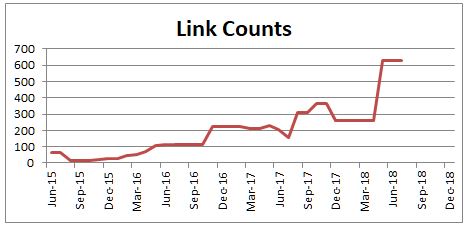
3. Improve your authority with inbound links

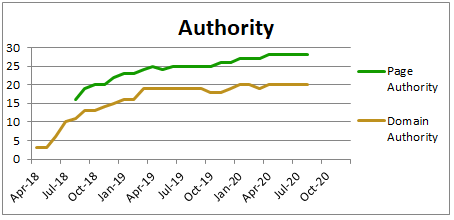
Growth in inbound links helps improve your Google rankings.
Continued growth in backlinks shows that people continue to find your information useful.

Your website’s authority, based on the number and quality of links from other websites, is a critical ranking factor at Google.  Inbound links need to be both authoritative and relevant to your site or web page.

If you’re a local or service-area business, local links have high relevance, even if they’re from businesses quite different from yours.  And citations which list your NAP (name, address, and phone) — and often a link — on local search engines, directories, maps, and mobile apps can help improve your Google rankings in local searches.  We offer affordable local search citation management services to our clients.

Top 10 Ways to Rank Better in Google

Click To Tweet

4. Maximize user experience

Google released a major algorithm change last year, called the Page Experience update.  If users find your website annoying, not only will they leave quickly but it will also reduce your rankings.

Your website needs to be responsive to the device looking at your site, often referred to as being mobile-friendly.  That relates not just to the appearance and usability of your site on a phone, but also to the download speed (phones tend to be slower than desktop computers).

Sufficient white space makes your content more approachable and less intimidating than a very dense-looking page. Avoid the TL:DR syndrome. You can also include images with text wrapping around them to make the page appear less dense.  Avoid annoying popups that obliterate content or delay the loading of a page.  Do whatever you can to make your page friendly and easy to read

5. Use heading tags

Employ subheadings because people tend not to read web pages, but scan them.  Subheadings help the reader find and focus their attention on what they need.  Identify them as headings or subheadings with heading tags in the code so search engines understand what they are.  Words enclosed in heading tags are considered more important by search engines.

6. Optimize images

Image size can have a big impact on your page speed.Images on your pages can be optimized for both speed and keyword placement to improve your Google rankings.

To make sure your images download as quickly as possible, make sure to size them properly before uploading them to your web page.  If you upload an image larger than you want it to appear on the page, all of the pixels of that larger image need to download before the browser can shrink it down to size.  And all that takes time. Shrinking your images before you upload them can very significantly reduce the number of pixels to download, speeding up your page display.

To optimize your images for keyword phrases, there are a few places to do that.

  • Use a keyword in the file name of the image.  A file name of blue-widgets.jpg is much more helpful to search engines than the file name of IMG418.jpg.  If you have multiple words in your file name, separate them with hyphens rather than underscore characters.  That’s because search engines understand hyphens (but not necessarily underscores) as separating words.
  • Describe the image in the alternate text, including a keyword phrase for the page can.
  • If the image is clickable and links to someplace else, you should give it a title tag.  When the user hovers their mouse above the image, the title tag will pop up in a small text box to tell the user where it will send them when they click. You can put keyword phrases in here, too.

7. Improve page speed

Page download speed is part of Google's Page Experience algorithm update.
Faster pages provide better page experience, which helps your rankings.

Page speed has been getting more attention since the Google Page Experience update in the summer of 2021.  How quickly your pages download into a browser translates into a better or worse customer experience.  And that’s directly related to how many customers stay on your page waiting for it to load, as opposed to returning to the Google search results and finding someone else.

If most visitors to your website come from their mobile devices (you can find that out in your Google Analytics) then your mobile speed may be more important than your desktop speed.  Sadly, mobile download speed is seldom as quick as desktop speed.

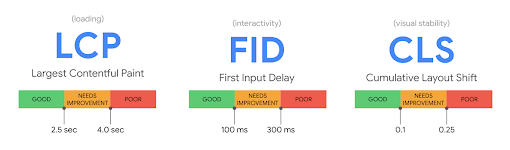
Google is looking very carefully at what it refers to as Core Web Vitals.  They relate to page speed, ease of interaction, and the visual stability of the page.  These can get pretty technical, and most readers will want to defer to their web designer or web programmer for dealing with them.

8. Optimize for voice search

People search for answers to their questions in search engines.Mobile phones now constitute more than 60% of all searches.  And the majority of those mobile searches are done by voice through Google or Siri rather than keyboarding.

Voice searches tend to be different from typed searches.  For one thing, they tend to be longer and more conversational.  Your web content needs to adapt accordingly.

Forbes has an interesting how-to article on optimizing for voice search that you may find helpful.

9. Fix technical issues

Technical issues on your site can cause problems for your visitors, but more often they interfere with search engines crawling and indexing your website.  And if they can’t crawl or index your site, you can’t show up in search results.  Here are a few things that can cause you trouble.  Fixing them can improve your Google rankings.

  • Broken links are those that result in a “404 Page Not Found” error.  those may be links to discontinued pages on your website or to pages on an external site that have been changed, moved, or deleted.  An occasional broken link is pretty normal, but if your website has too many of them that can be a problem.
  • Server errors occur when the web hosting server is unable to display the requested page.  When monitoring tools are reporting server errors that you can’t replicate manually, that usually means there’s nothing wrong with your website. Instead, the web server was too slow.  Shared web servers can have many websites on them, and if they’re overloaded they can slow down or be unable to deliver a web page. If that’s happening to you, it’s time to ask your web hosting company to move you to a less crowded or faster server.  If that doesn’t work, you may need to change your web hosting provider.
  • When a page moves to a new URL or is deleted, it’s important to properly redirect that URL to its new location or the closest matching page on your site.  Redirect chains occur when page A has been redirected the page B, but then page B redirects to another page C.  These can slow down search engine spiders and cause some pages on your website to be overlooked.
  • Duplicate content will get you nowhere.
    Duplicate content can get you filtered out of search results.

    If the search engines think that multiple pages on your website contain essentially duplicate content, some of those pages are unlikely to show up in search results.  Pages that have relatively thin content often trigger the duplicate content flag.  These are pages where the unique content on the page is relatively small compared to all of the common content that exists on many pages (headers, footers, logos, and so forth).  The remedy for that is to expand the content on those pages so they are clearly different from one another.

  • Page titles and meta tag issues are quite common.  Duplicate page titles and meta description tags interfere with one another in search engine indexing.  Missing page titles and descriptions are probably even worse.  We also see page titles and descriptions that are either too short to be effective or too long.  It’s good to have a tool that can monitor your website and alert you to any of these conditions.  We use Moz to detect and report on these for our clients.

10. Local SEO (if appropriate)

If your business has a brick-and-mortar location or serves customers in a geographical area, you’ll benefit from Local SEO.  eCommerce sites or those that serve customers nationwide may not need it.

If you do need local SEO, here are the main items that need your attention.

  • Local search map pin iconOn-page mentions of your service area, whether it’s a whole state, counties, or cities and towns. A separate page itemizing your service area is not very effective in helping your other pages show up in local searches.
  • A robust Google Business Profile is essential.  And when you create it, fill out as much information about your business as it allows.
  • Structured data markup in accordance with schema.org should be in place on every page with at least your NAP.  Expanding it with business hours and other information about your pages helps as well.
  • Citations are mentions of your business with your NAP and other information.  You need to be widely listed on many sites across the web with consistent information about your business.  The more local search engines, directories, maps, and mobile apps that list you, the better – as long as the information on them is consistent across the board.  You can check how well your citations are doing with our free citation scan.
  • Local PR is another excellent tool to cement your local presence.  If you sponsor local activities and support local charities they may have the opportunity to mention that online.  It’s also helpful if your business can receive a mention in a local newspaper article or hyperlocal news website story.  And of course if these mentions can include a link back to your website, that’s just icing on the cake.

Final thoughts

If you’re lucky, you may only need to work on a few of the above areas.  I encourage you to evaluate your website in each of those areas and focus your attention on the ones most in need of improvement.

Of course, if you find the process daunting, we’ll be happy to help you. 

We welcome your thoughts on any or all of the above. Start a discussion below.

Do you find this helpful? If so, please share it with the buttons on the left or the Click-to-Tweet above.

  • Page 1
  • Page 2
  • Page 3
  • Interim pages omitted …
  • Page 12
  • Go to Next Page »

Primary Sidebar

More Links

  • Why Rank Magic
  • Our Staff
  • SEO Clients
  • Testimonial
  • Strategic Partners
  • Free Live SEO Training
  • Contact Us
  • SEO Ethics Statement
  • NJ Small Business SEO in East Hanover

What’s Related To This

  • SEO is an Essential Part of Internet Marketing
  • Our SEO Services Help More Customers Find You
  • Our SEO Process
  • Keyword Research & Selection
  • Optimization Recommendations
  • Submitting to Search Engines
  • Frequent Progress Reports
  • Building Link Popularity
  • Local Search Optimization
  • Canonicalization
  • SEM & Pay Per Click

More Information from us

Free Overview & Pricing Guide Sign Up For Our Newsletter

Sign up for our Email Newsletter

It comes out monthly and highlights the best blog posts from the previous month.

Sign Up For Our Newsletter

Think you can benefit from our help?

Free Overview & Pricing Guide

Categories

  • analytics
  • Bing
  • blogs
  • canonicalization
  • copywriting
  • directories
  • domains/URLs
  • email
  • Google
  • keywords
  • links
  • local search
  • malware
  • marketing
  • page content
  • PageRank
  • PPC/sponsored links
  • Rank Magic
  • redirects
  • SEO companies
  • SEO practices
  • social media
  • Uncategorized
  • user experience
  • web design
  • Yahoo

Tags

+1 AI Optimization algorithm changes AOL article marketing black hat SEO bounce rate Choose an SEO citations conversion core web vitals customer focus description domains-URLs doorway pages duplicate content EMD first impressions googlebomb humor keyword density keyword stuffing local long tail keywords meta tags mobile nofollow page speed page title Panda Penguin Pigeon Possum PowerListings presentations redesign reputation management reviews ROI schema security sitemap small business spam white hat SEO

Archives

Blog Directories

SEO blog blog directory Computer related consulting services in East Hanover

Top Seo Agency in Elizabeth

Footer

Rank Magic, LLC

SEO for Small Business

NJ SEO company helping small and very small businesses nationwide compete online from offices in East Hanover, New Jersey

Social

  • linkedin icon
  • twitter icon
  • facebook icon

  • Home
  • SEO
  • SEO is an Essential Part of Internet Marketing
  • Our SEO Services Help More Customers Find You
  • Rank Magic’s SEO Process
  • Link Building
  • Multiple URLs (Canonicalization)
  • Keywords
  • Optimization Recommendations
  • Local Search Optimization
  • Submitting
  • Reporting
  • PPC Pros & Cons
  • About Us
  • Staff
  • SEO Clients
  • Testimonials from Some of Our Clients
  • Strategic Partners
  • Blog
  • Contact Us
  • Overview & Pricing Guide Signup
  • Other Links
  • Site Map

© Copyright 2005-2022 Rank Magic, LLC. All Rights Reserved | Web services by TAG Online, Inc.
BACK TO TOP

  • Home
  • About Us
    • Why Rank Magic?
    • The Rank Magic SEO Team
    • Selected Clients
    • Testimonials from Some of Our Clients
    • Strategic Partners
    • Business Presentation on Internet Visibility
    • Contact Us
    • SEO Ethics
    • NJ SEO Company – Small Business SEO & Local SEO Experts
  • SEO
    • SEO is an Essential Part of Internet Marketing
    • Our SEO Services Help More Customers Find You
    • The SEO Process Explained: How SEO Works, Step-by-Step
    • Keyword Selection
    • SEO Recommendations
    • All About Search Engine Submissions
    • Monitoring SEO Results
    • Link Building for Ranking Authority
    • Local Search Optimization
    • Canonicalization
    • SEM Pay Per Click Ads
  • Local SEO
  • SEO Blog
  • Contact Us